Introduction
In 2025, writing code without an AI assistant is like trying to build a house without power tools. Sure, you can do it with just a hammer and saw, but why would you?
The market for AI coding tools has exploded. What started with simple autocompletes has evolved into autonomous agents that can refactor entire codebases, fix bugs before you spot them, and even write documentation.
But with every company launching an “AI Copilot,” the choice is overwhelming. Should you stick with the industry standard (GitHub Copilot)? Should you switch to a specialized AI editor (Cursor)? Or is the free version of ChatGPT enough?
We tested all three for a month. Here is the definitive verdict for developers.
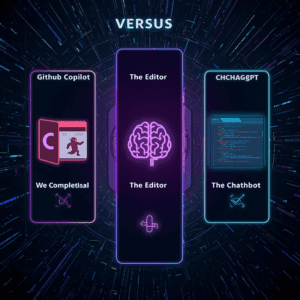
Caption: The three titans of AI coding: The Plugin (Copilot), The Editor (Cursor), and The Chatbot (ChatGPT).
1. GitHub Copilot: The Industry Standard
The Pitch: “Your AI pair programmer.”
How it Works: It lives as an extension inside your VS Code editor.
The Good:
-
The “Ghost Text”: Copilot is famous for its uncanny ability to predict your next line of code. You type
def calculate_averageand it fills in the rest in grey text. You just hitTab. -
Enterprise Security: Because it is owned by Microsoft/GitHub, it has the best security compliance for large companies. Most 9-to-5 jobs will provide this tool for you.
-
Context Awareness: It looks at other tabs you have open to understand your coding style.
The Bad:
-
Limited Scope: It is still just a plugin. It struggles to understand your entire project architecture at once. It is great at writing functions, but bad at refactoring a whole system.
Best For: The corporate developer who wants a seamless, “it just works” autocomplete experience.
2. Cursor: The Disruptor
The Pitch: “The AI-first Code Editor.”
How it Works: Cursor is not a plugin. It is a fork of VS Code. You actually download a whole new editor.
The Good:
-
Codebase Awareness: This is the killer feature. Cursor indexes your entire project.3 You can ask, “Where is the authentication logic broken?” and it will search 50 different files to find the answer. Copilot cannot do this as well.
-
“Cmd+K” Editing: You highlight a block of code, hit
Cmd+K, and type “Change this from a loop to a map function.” It rewrites the code in place. No copy-pasting from a chatbot. -
Privacy Mode: It offers a toggle to ensure your code is never used to train their models.
The Bad:
-
Switching Cost: You have to install a new editor. Although it looks exactly like VS Code, migrating your settings and extensions can be annoying.
Best For: Solo founders and serious engineers who want the most powerful AI integration available today.
Caption: Cursor allows you to chat with your codebase, highlighting sections and rewriting them instantly.
3. ChatGPT (Plus): The Generalist
The Pitch: “The smartest AI model in the world.”
How it Works: A browser-based chat window.
The Good:
-
Reasoning Power: GPT-4 (and newer models) is still smarter than the smaller models used by Copilot for autocomplete. If you have a complex architectural question or need to brainstorm a database schema, ChatGPT wins.
-
Debugging: You can paste a massive, ugly error log into ChatGPT and ask “What does this mean?” It explains the error better than any IDE.
The Bad:
-
The “Copy-Paste” Loop: You have to copy code from your editor, paste it into Chrome, wait for an answer, copy it back, and fix the formatting. It disrupts your “Flow State.”
-
No Context: It doesn’t know you renamed a variable in a different file 5 minutes ago.
Best For: Debugging weird errors, brainstorming ideas, and learning new concepts.
4. The Comparison Table
| Feature | GitHub Copilot | Cursor (AI Editor) | ChatGPT (Plus) |
| Type | VS Code Extension | Standalone Editor | Browser Chatbot |
| Project Context | Medium | High (Best) | None |
| Autocomplete | Excellent | Good | N/A |
| Refactoring | Good | Excellent | Poor (Copy-Paste) |
| Price | ~$10/mo | ~$20/mo | ~$20/mo |
| Best Use Case | Fast Typing | Building Features | Architecture/Debug |
The Verdict: What Should You Buy?
If you can only pay for one subscription in 2025:
- The Winner: Cursor.The ability to “Chat with your Codebase” is a productivity superpower that saves hours of searching. Since it is built on top of VS Code, you don’t lose your favorite extensions. It feels like the future of coding.
- The Runner Up: GitHub Copilot.If your company pays for it, use it. It is excellent for speed.
- The Companion: ChatGPT.Don’t use it for writing code anymore. Use it for planning code.
5. Add a specific “Coding Challenge”
Here is what happened in my local environment (VS Code):
1. GitHub Copilot:
-
Result: It suggested the code line-by-line.
-
The Flaw: I had to manually hit “Tab” about 50 times. It also forgot to import the
randomlibrary, which caused a crash on the first run. -
My Take: Good for autocomplete, bad for building from scratch.
2. ChatGPT (GPT-4o):
-
Result: It wrote the entire script in one go.
-
The Flaw: The code worked, but the “restart” button was missing. When I asked it to fix it, it rewrote the entire code block instead of just editing the specific function.
-
My Take: Great for logic, but annoying to copy-paste back and forth.
3. Cursor (The Winner):
-
Result: I typed
Cmd+Kand asked it to generate the game. It wrote the code directly into my file. -
The Win: When I got an error, I just clicked “Fix in Chat,” and Cursor scanned my terminal and fixed the bug automatically.
-
Verdict: For this specific test, Cursor saved me about 10 minutes of debugging compared to Copilot.
Conclusion
The fear that “AI will replace developers” is misplaced. AI is replacing typing.
By offloading the syntax and boilerplate to tools like Cursor or Copilot, you are free to focus on the logic and the product. Pick your tool, master its shortcuts, and build faster.