
Introduction
In 2025, cybersecurity is no longer a niche topic for IT professionals or tech enthusiasts. It is a fundamental life skill, as essential as locking your front door or looking both ways before crossing the street.
The reality of the modern web is stark: hackers are no longer lone wolves typing furiously in dark basements. They use automated “bots” and Artificial Intelligence to scan millions of devices every hour, looking for the smallest crack in the armor. Whether you are a freelancer, a student, or a casual browser, you are a target—not necessarily for who you are, but for the data you hold.
The good news? You do not need to be a coding genius to stay safe. 90% of cyberattacks succeed because of simple human errors, not complex technical breaches. By adopting just a few “digital hygiene” habits, you can make yourself virtually hacker-proof. This guide covers the essential, non-negotiable steps to secure your digital identity today.
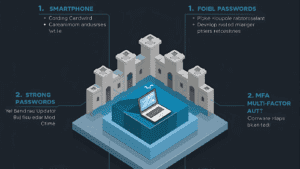
1. Kill the “Rememberable” Password
The biggest lie we tell ourselves is that we can remember strong passwords. We can’t. If you can remember it (e.g., Rover1985!), a hacking program can guess it in seconds.
The Solution: Use a Password Manager In 2025, using a password manager is mandatory. Tools like Bitwarden, 1Password, or the built-in managers in Apple/Google ecosystems generate long, complex strings of random characters for every single account you own.
-
Why it works: You only need to remember one master password. The software handles the rest.
-
Action Step: Download a password manager today. Start by changing the passwords for your “Big Three”: Email, Banking, and Social Media.
2. The “3-2-1” Backup Rule (Your Ultimate Safety Net)
Ransomware is a type of malware that locks your computer and demands money to release your files. Even if you pay, there is no guarantee you will get your data back. The only 100% effective defense against ransomware is having a backup.
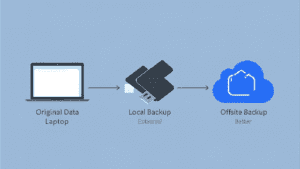
Follow the Golden Rule of Backups: 3-2-1.
-
3 copies of your data (The original + 2 backups).
-
2 different media types (e.g., Your Laptop Drive + An External Hard Drive).
-
1 offsite copy (Cloud Storage like Google Drive, OneDrive, or Backblaze).
Action Step: Set your computer to automatically back up to a cloud service every night while you sleep.
3. Multi-Factor Authentication (MFA): The Gatekeeper
If a hacker does steal your password, Multi-Factor Authentication (MFA) stops them from logging in. It requires a second form of proof—something you have (like your phone) to verify something you know (your password).
The Hierarchy of MFA:
-
Good: SMS Text Codes (Better than nothing, but vulnerable to SIM-swapping).
-
Better: Authenticator Apps (Google Authenticator, Microsoft Authenticator). These generate codes offline on your device.
-
Best: Hardware Keys (YubiKey). A physical USB stick you plug in.
Action Step: Enable MFA on your email account immediately. Your email is the “master key” to all your other accounts (password resets go there), so protect it fiercely.
4. The AI Phishing Threat: Trust No One
Phishing used to be easy to spot: misspelled words, pixelated logos, and absurd stories about foreign princes. But Generative AI has changed the game.
Hackers now use AI to write perfectly fluent, personalized emails. They can scrape your LinkedIn profile to know your job title, your boss’s name, and your writing style.
How to Spot an AI Phish:
-
Check the Sender: Hover over the email address. Does it say
@support-amazon-service.cominstead of@amazon.com? -
Verify Out-of-Band: If your “CEO” emails you asking for an urgent gift card purchase or a wire transfer, do not reply. Call them or message them on Slack to verify.
-
The “Urgency” Trigger: Scammers rely on panic. If a message demands you act right now or lose access, take a deep breath. It is likely a scam.
5. Public Wi-Fi is Not Your Friend
Working from a coffee shop is great; getting your credit card info stolen is not. Public Wi-Fi networks are often unencrypted, meaning a hacker sitting three tables away can potentially intercept your traffic.
The Solution: Use a VPN (Virtual Private Network) A VPN creates an encrypted “tunnel” for your data. Even if someone intercepts it, they will only see scrambled code.
-
Rule of Thumb: Never check your bank account or log into work portals on public Wi-Fi without a VPN.
-
Note: Avoid “Free” VPNs. Running a server costs money; if they aren’t charging you, they are likely selling your browsing data to advertisers. Stick to reputable paid services.

6. The “Silent Shield”: Software Updates
We all hate that “Update Available” popup. It interrupts our work and takes time. But those updates rarely contain just “new features”—they contain critical security patches.
Software companies (like Microsoft, Apple, and Adobe) constantly find “holes” in their code that hackers can exploit. An update is the patch for that hole. By delaying the update, you are leaving the door open for days or weeks.
Action Step: Turn on “Automatic Updates” for your Operating System and your Web Browser.
7. Privacy Checkups
Finally, review what you are already sharing. Social media platforms often default to “Public” sharing settings.
-
Facebook/Instagram: Check who can see your friends list and posts. Scammers use your friends list to clone your profile and scam your family.
-
Google: Go to your Google Account settings and run a “Privacy Checkup” to auto-delete your location history and web activity after 3 months.
Conclusion
Cybersecurity is not a product you buy; it is a mindset you adopt. You cannot build a perfect wall, but you can make yourself a “hard target.”
Hackers are opportunistic. If you have MFA enabled, a strong password manager, and updated software, they will likely move on to an easier target. Start with one step from this list today—perhaps downloading a password manager—and you will instantly be safer than 80% of internet users.